Low Power
Power consumption is rarely a major concern in typical Arduino projects. Most development boards are powered continuously over USB or from a power supply, so using a few extra milliamps often makes little practical difference.
That changes when a project runs from a tiny battery. Coin cells store a limited amount of energy and cannot continuously supply the same current as a USB connection or a larger battery. Even a small amount of unnecessary current draw can reduce battery life from months to days, or prevent the circuit from working reliably at all.
Low-power design keeps the microcontroller and peripherals active only when they are needed. The rest of the time, pinch can enter deep standby and wake in response to an external event. This makes it possible to build compact, battery-powered sensors, controls, wearables, and other devices that spend most of their time waiting rather than processing.
This section covers how to put pinch into deep standby, select a wake-up pin, and measure the resulting power consumption using Sistemi's P1150D.
Deep Standby
pinch uses the SAMD11 microcontroller, so we created a dedicated library named
PinchLowPower to provide deep standby support for the board. The library is
included with the moddo SAMD board package, so there is nothing else to install.
Add the library at the top of your sketch:
#include <PinchLowPower.h>
Before entering deep standby, configure a wake-up source so the board has a way
to resume operation. Define WAKE_PIN as the digital pin you want to use, then
configure it in setup():
pinMode(WAKE_PIN, INPUT_PULLUP);
PinchLowPower.attachInterruptWakeup(WAKE_PIN, FALLING);
The internal pull-up keeps the wake pin high. Connecting the pin to GND creates a falling edge and wakes pinch from deep standby.
You can use INPUT_PULLDOWN with RISING instead. In that configuration, the
wake pin is normally low, and connecting it to 3.3 V wakes pinch.
When your sketch is ready to sleep, call:
PinchLowPower.deepSleep();
This puts the SAMD11 into deep standby and pauses the sketch until the
configured external interrupt wakes it. Execution then continues on the line
after PinchLowPower.deepSleep();.
Testing and Results
Below is the test setup used to measure deep standby power consumption using the P1150D.
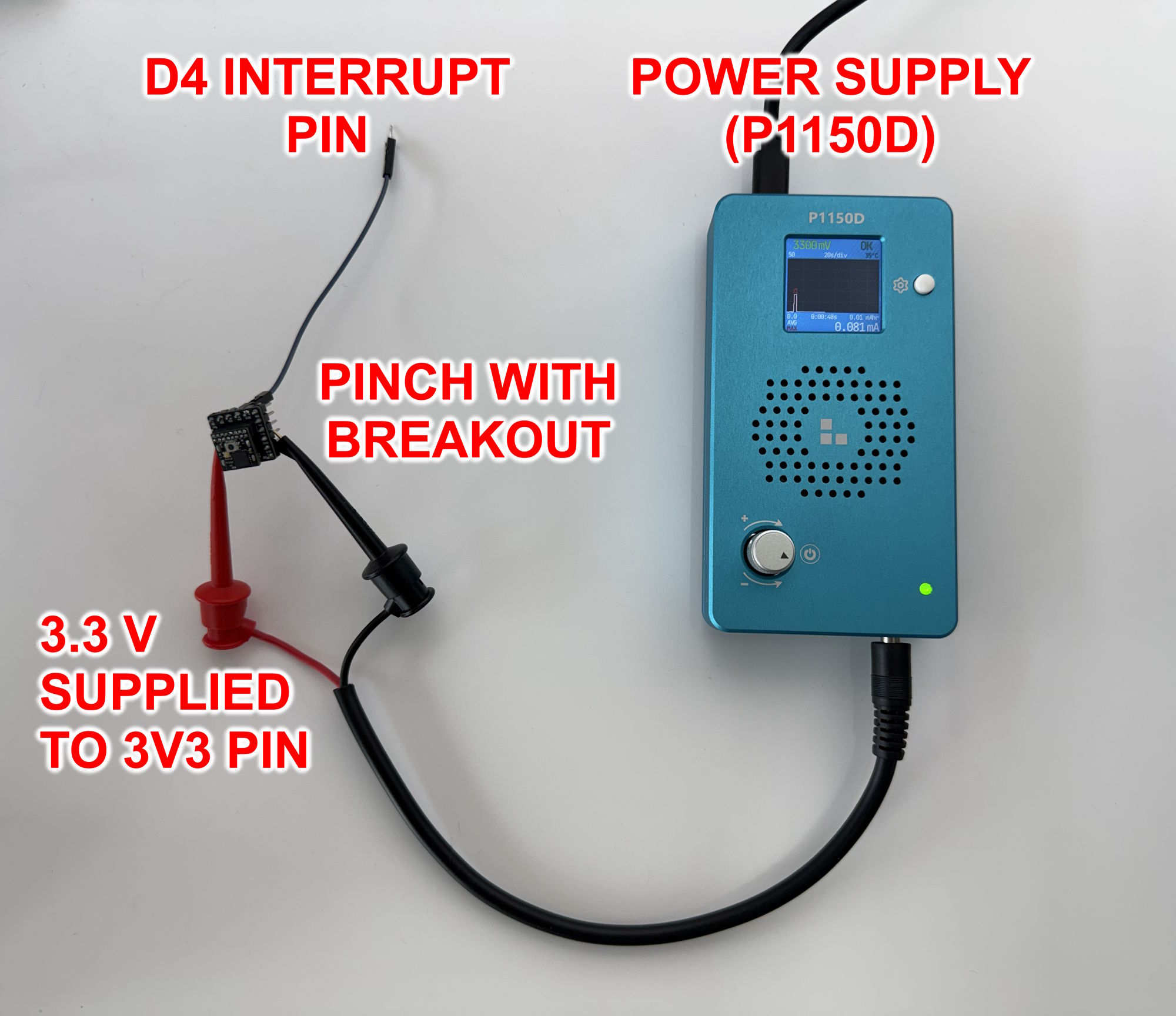
The Arduino sketch keeps pinch in deep standby until the user wakes it through the configured wake pin. Once awake, pinch flashes the RGB LEDs for three seconds, then returns to deep standby. As shown in the video below, pinch consumes approximately 70 µA in deep standby and approximately 16 mA while active with the RGB LEDs flashing. For reference, a 70 µA standby current could allow pinch to run for more than 135 days on a typical CR2032 coin cell if it remains in deep standby most of the time. This test uses the DeepSleep.ino example with D4 configured as the wake pin.
For comparison, the video below shows pinch without deep standby. The sketch
runs continuously in loop() and flashes the RGB LEDs without putting the
microcontroller to sleep. In this state, pinch consumes approximately 2 mA.
For reference, it would last less than five days on the same typical CR2032
coin cell.
Final Results
| Mode | Behavior | Current Consumption | Example Battery Life With a Typical CR2032 Coin Cell |
|---|---|---|---|
| Deep Standby | Sleeps until triggered through the wake pin | Approximately 70 µA while sleeping | More than 135 days |
| Without Deep Standby | Runs continuously in loop() | Approximately 2 mA | Less than 5 days |